Redesigning an app, allowing an unfamiliar and innovative product to be understood, leading to initial sales and positive user reception
Data analysis in sports and patient care is very restrictive. It is limited to either inconvenient lab-based machinery, or unreliable but portable equipment, creating a gap in the market for a reliable yet convenient product for movement analysis.
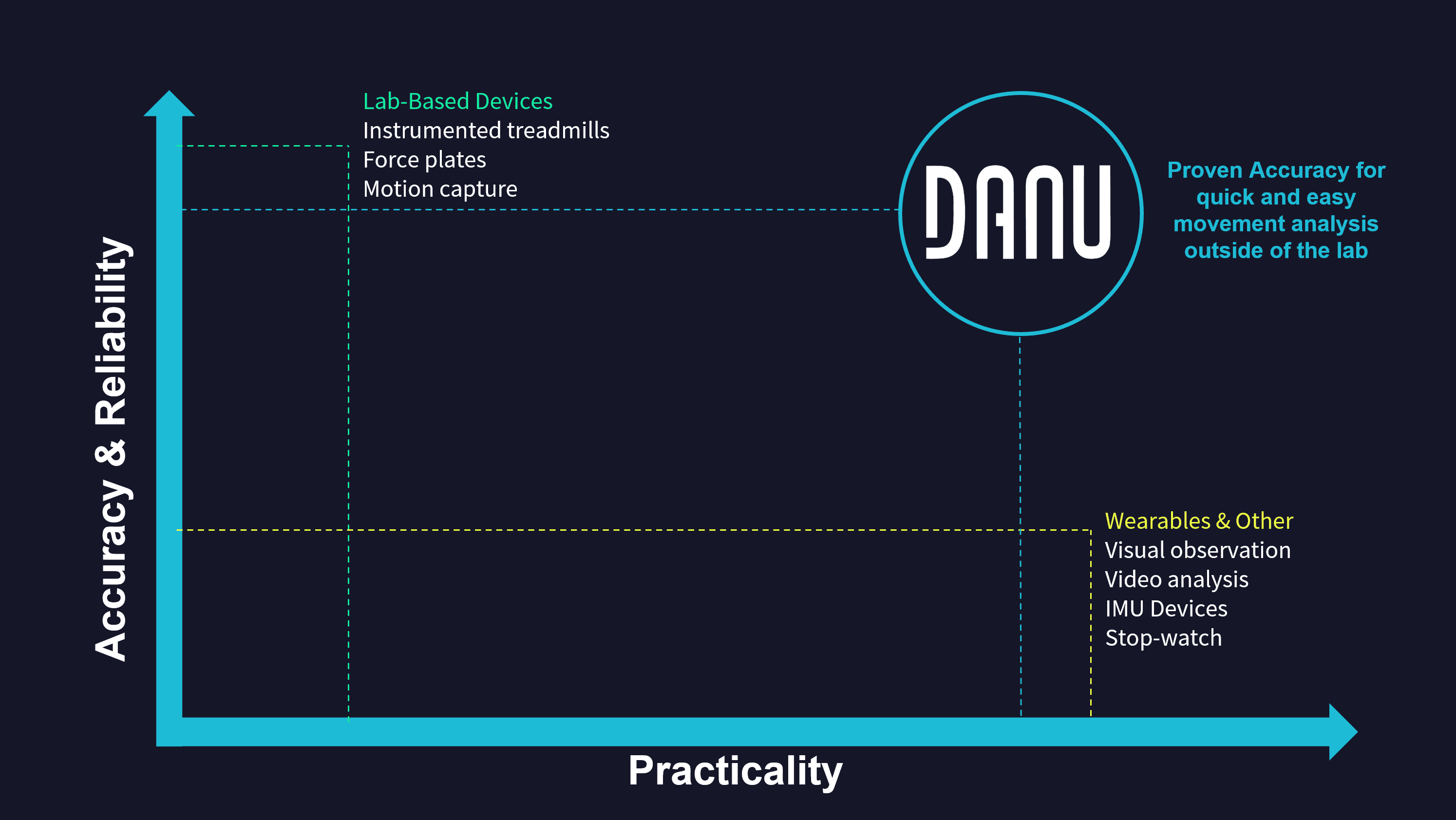
DANU Sports aims to bridge this gap by offering an innovative solution which combines proprietary hardware and a powerful data analysis platform. However, introducing a new product into a field where many professionals expect perfection from the systems they are using presents many challenges. Clients’ first impressions are crucial.
As the sole designer at DANU sports, my role was multifaceted and I was tasked with solving a wide variety of problems. However, my most impactful project was the design of the DANU Sports app for iOS.
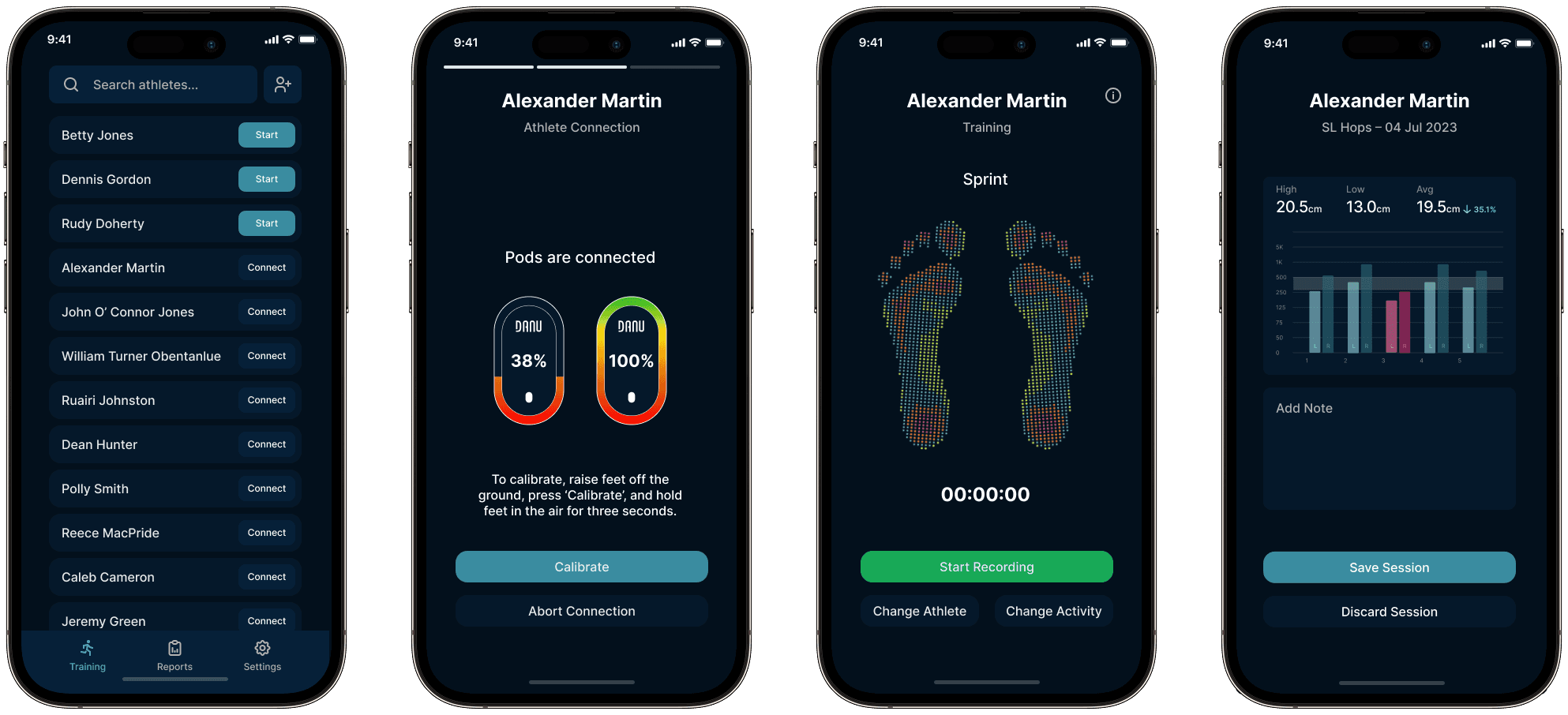
The final app design, showcasing four of the main screens.
The app serves as the interface between the user and the product, allowing the user to connect to the smart socks and record data using their iPhone or iPad. Initially, the expected audience was sport team’s coaches, with a shift during development to also include medical and clinical patients. This meant that the user flow had to be quick (for coaches) and also straight forward (for patients).
So, what's the problem?
Project background information:
When I joined DANU Sports, the app experience was poor; it was buggy and not user friendly. A proof-of-concept rather than a final product.
I found that users who had not used the app before, myself included, were confused on how to pair the product to the app, and then how to use the app to track data.
The confusing user flow and inconsistent design throughout the app obscured the true potential and convenience of the product.
The company was at risk of not securing very critical initial clients due to the lacklustre product experience.
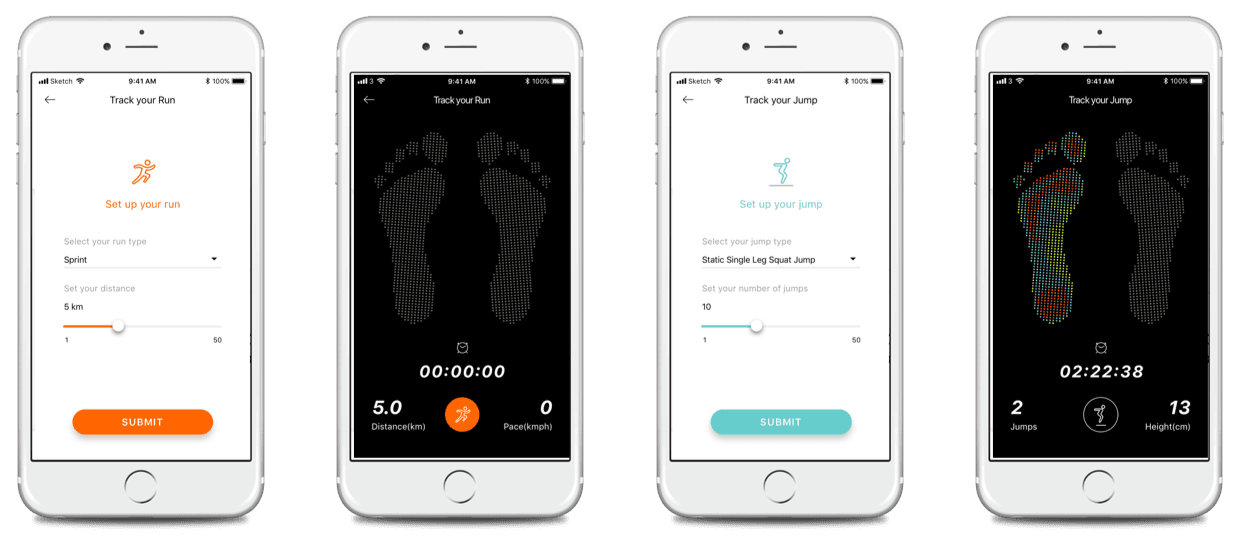
The concept app design – not even the production app at the time.
I instantly recognised the need for a complete redesign, or at the very least a revamp of some of the flows and designs.
Geared with my findings, I presented to my team the importance of a complete redesign. The goal of the project was to overhaul the whole experience, greatly improving the usability as well as creating a consistent visual style. The team instantly agreed to my proposal of a full redesign and rebuilding the app from scratch, letting me focus on the overall user experience first-and-foremost.
The design process
I went into the design process with an emphasis on streamlining the user flow to better highlight the product’s convenience over competitors.
Given the unique nature of the product, my research was focused on design principles and guidelines, rather than drawing design inspiration from other products or competitors. This approach allowed me to create a unique flow which adhered to laws of UX and common guidelines, ensuring a positive experience thanks to the tried and tested methods.
The old app’s user flow was quite convoluted with unnecessary steps, however I still took this flow as the basis of a new user flow. I broke it down into categories, retaining essential steps and removing as many steps as possible to simplify the process – creating my new basis to work with.
I created a low-fidelity interactive Figma prototype and tested the new flow internally. Some sections like “home” were completely removed, with some sections only receiving mainly visual updates if they were previously easy-to-use. The team enjoyed the simplicity of the new design, and without abandoning any functionality, it became a resounding success.
Following the success of the prototype, it was time to think about the visuals. I created a small library of components for the app to ensure design consistency throughout. For the design language, I took inspiration from Revolut’s app (as i am a fan of the overall design of it) and Google’s Material Design 3 (as it is a comprehensive system).
I created a colour palette which would be applied consistently throughout the app. This colour palette was in part dictated by the hierarchy I developed in the prototype. Being a dark-themed app, I had to ensure colours correctly reflected the elevation levels of different components.
I convened with the developers to ensure it was possible to implement the design and if it needed any adjustments arising from technical limitations. Thankfully everything was suitable for development, so I finalised the high-fidelity prototype of the app. It got approval from the rest of the team and I worked closely with the developers over the next few months to ensure smooth implementation of my design.
User testing
Following the development, we conducted usability tests with external users. The feedback was mostly positive, but there was a minority which had negative comments about the “calibration” part of the flow. We found it an error-prone step due to user input errors.
At first I was not sure whether the feedback from the users was integral enough to modify the flow, but then i recalled Don Norman’s thinking from his book The Design of Everyday Things, which states mistakes happen because of users having a different mental model of what an interface should be like, compared to the interface of your product. This meant my design did not follow the status quo and users were not sure on how to interact properly without prior experience (the same issue as the original app). With this new feedback on board I was able to evaluate the flow again.
Reviewing the design, I was perplexed on how to make positive changes to the flow. To help me, I held a meeting with the data scientists and we discussed potential solutions. Thanks to new hardware functionality coming to the product soon, it was possible to introduce new features to the flow which would make it more straightforward and less prone to user error.
This was achieved through automating a part of the calibration process and not having to rely on the user to input the correct connection point. This removed the pain point entirely, and the new calibration flow was less prone to user error. Quick user testing with previous participants showed all users were satisfied with the new flow.
This experience was a tremendous learning opportunity of never taking my design for granted, listening to user feedback, and then pivoting accordingly. It was a very important lessons in my career as a designer.
In reflection
I conducted another round of usability testing once the app was ready with the new changes and found that it was able to be used without any errors or assistance by 93% of users which had no prior experience (using a wide demographic). Users also stated the overall product was easy to use.
The positive reception to the app filled the team with confidence, soon leading to the company’s first sale, proving the redesign to be a resounding success. The app has been praised for its ease-of-use at medical and sport conferences. The modular design of the app also allows for more features to easily be added should a need arise, making the design futureproof.
Note: Since the original writing of this case study, many features have been added to the app seamlessly, without disturbing the functional design or the original user flow.
I’m happy to say my contributions helped position the company for continued success, and the current app is leaps and bounds better than the previous app.
© 2026 Kacper Ufniarz