This case study is a work-in-progress. Images coming soon.
How I condensed a dataset into a understandable summary, leading to better user understanding of the product and data.
Myself, the developer & two data scientists created a summary on the DANU Analytics web platform in 2024 & 2025 intended for users to better understand the metrics gathered by the DANU product.
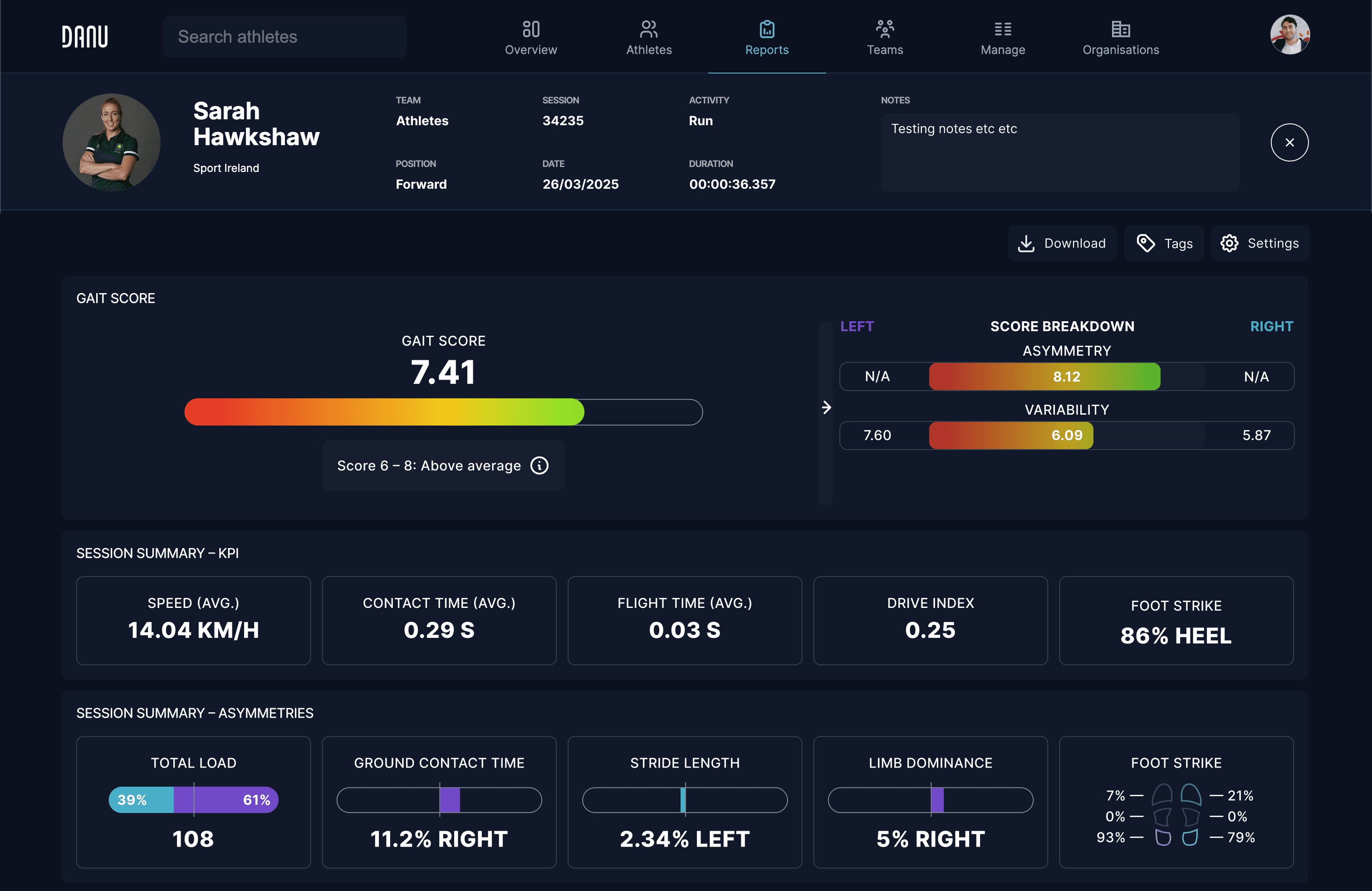
Screenshot of a session summary from the DANU Analytics platform.
Situation
Most users of the DANU analytics platform were overwhelmed with the complexity of the data presented. This is inline with the “Choice Overload” UX law as there were many data points presented which didn’t paint a clear picture on their own.
My team (CEO & data scientist) asked me to come up with a solution to the client’s pain point. They proposed a few solutions they thought could work, i.e. a summary tab or a summary graph.
This was an important pain point to solve because if our users couldn’t understand the data they were collecting, they would have no value in continuing to use the product.
Figuring out the deliverables
I implemented the double-diamond framework to help me on this project, and I was able to stick to it for the duration.
First of all, the goal of the exploratory phase of the first diamond was to figure out the specific issue at hand. Users were overwhelmed with the data presented, but the issue could be more specific; is the data too complicated, is there too much data shown at once, is the data even important for the user’s use case? The answer was required to find out what kind of deliverables will be required to solve the user’s pain point.
To contextualise the issue better, I talked with the data scientist on my team, and we established there were two kinds of users using the DANU analytics platform; power-users which were able to take full advantage of all the data provided gathered by the system (i.e. data scientists, medical researchers), and users who were not able to extract the full potential of the data (i.e. team coaches, physiotherapists). This resulted in a scenario where the latter clients didn't see the full potential of the product and would not be interested in purchasing the system, meaning the company was losing out on customers that demo'd the product.
During the final phase of the first diamond, I concluded that we would have to add a new system or interface to the analytics platform, one which would help the non-power-users better understand the existing, comprehensive data, rather than reworking the current data visualisation implementation.
Narrowing down on the deliverables
Starting off the second diamond in the double-diamond process, I knew my goal was to present a comprehensive set of data in a new format which would be easier to understand. I started this stage by creating a mind map of possible solutions, including asking a LLM (ChatGPT in this case) for extra suggestions to ensure I didn’t miss any obvious solutions.
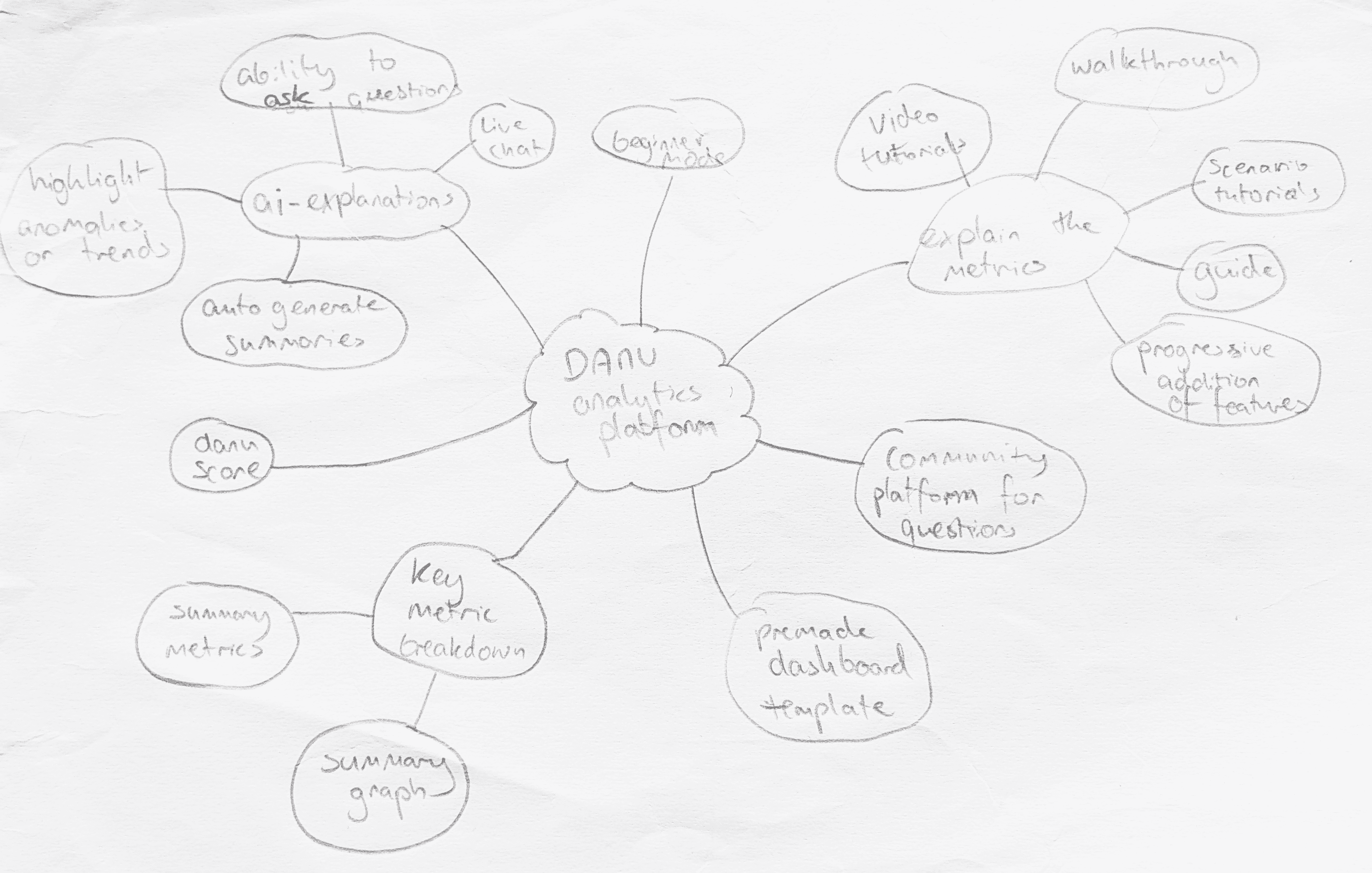
Mind map of possible solutions to the user problem.
Ideas came quickly, but choosing the correct solution that worked for us out of the generated ideas was more complicated. I condensed the results of the mindmap into a list of possible solutions to find out exactly what each solution would entail, and to filter out duplicate ideas. I then decided to categorise the projects in an impact/effort matrix to judge if any of the ideas was a quick win. I spoke with the two developers that work on the Analytics Platform to better understand the workload associated with each possible solution.
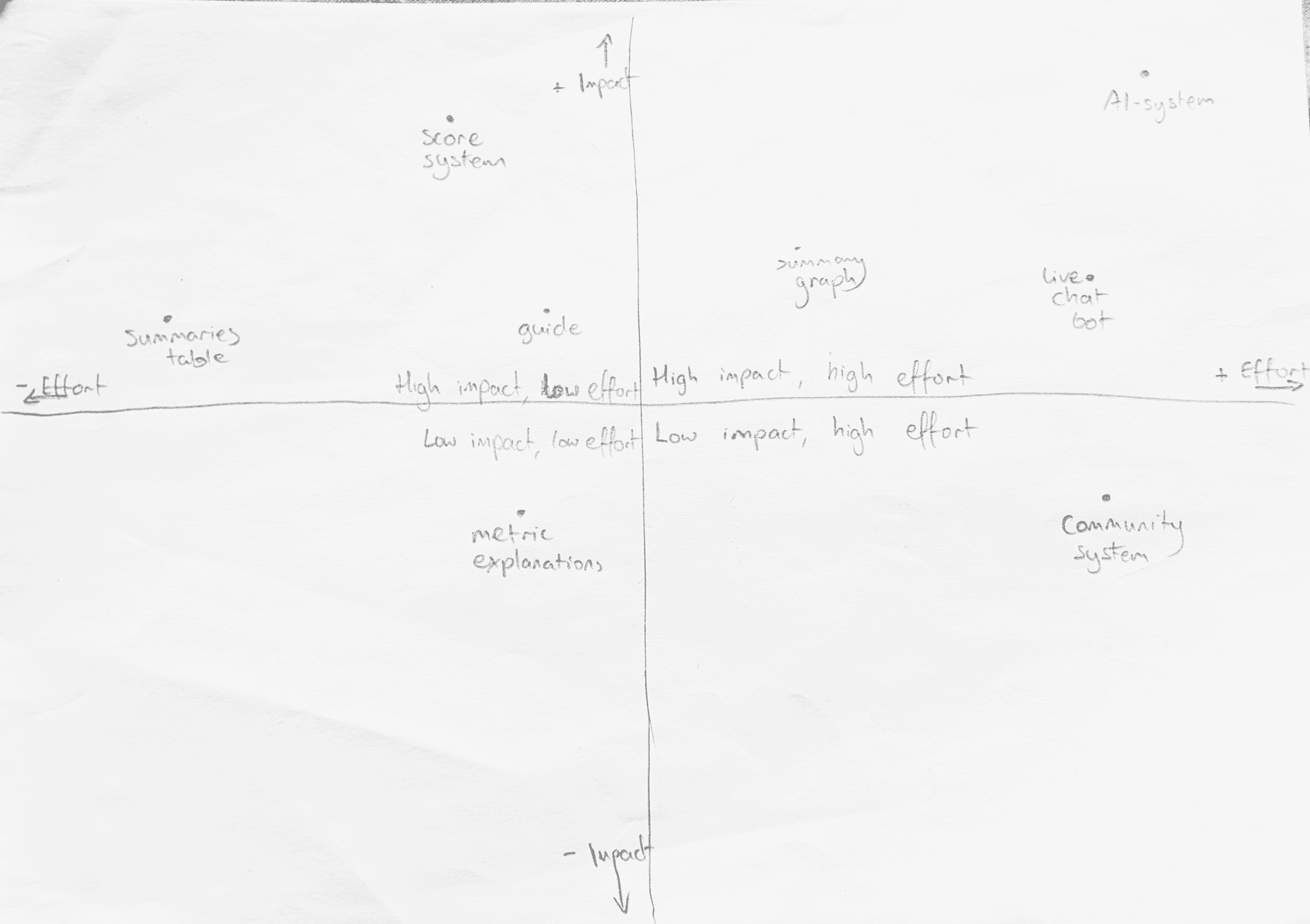
Effort matrix of the best solutions from the mind map
Three solutions ended up in the low effort, high impact square; a summary table, a score system, and a written/video guide. I proposed all three solutions to the team (data scientists, CEO) with a list of pros and cons. Together we chose to work on the summary table and the score system in the immediate term, with the written/video guide coming afterwards.
The decision to implement multiple solutions was chosen due to a variety of factors; 1. We knew it wouldn’t be a large workload to develop these features but they would bring value to all users 2. We wanted to create more options for our users on how they interacted with the system.
The design process
The next stage of the project was creating the first feature; the summary table. I began by figuring out the exact deliverables; how is this element going to fix the customers’ pain point? My answer, at this stage, was that it would provide a snapshot of the generated metrics by turning them into a few easily-legible numbers and graphs, allowing users to understand the results of a session they captured without having to deeply analyse each metric.
To achieve this result, I conducted another brainstorm session with my team as they may have had a different viewpoint on our customers’ needs. We needed to determine what type of metrics the users would find useful, and during the meeting, we established that we would require two types of metric; a numerical value and a visual representation of an asymmetry.
Now that I had my deliverables set out, I started by creating thumbnail sketches of layout ideas, however because the table was to have detailed metrics I found this step not too helpful. I chose a sketch which looked relatively well laid-out and began high fidelity prototyping, skipping over wire framing, because I needed to visualise the populated data sets.
I acquired a list of potential ‘metrics’ which could be used in the summary table from our data scientist. I used those metrics to populate a simple grid layout, but I could instantly tell this design wouldn’t work as all the elements felt too different from one another, creating a “bento” style chaos.
My next iteration focused on creating consistency between the elements, but it still felt disjointed compared to the rest of the ‘Session Report’. There was no unity between the elements and they felt like they were floating, so I had to group them. However, I had decided to separate the metrics into two groups; ‘KPI’ and ‘Asymmetries’. This helped avoid a weird feeling of inconsistency when there were different amount of metrics in the top or bottom row. The iteration after this introduced a faint bounding box to allow users to easily distinguish between each metric.
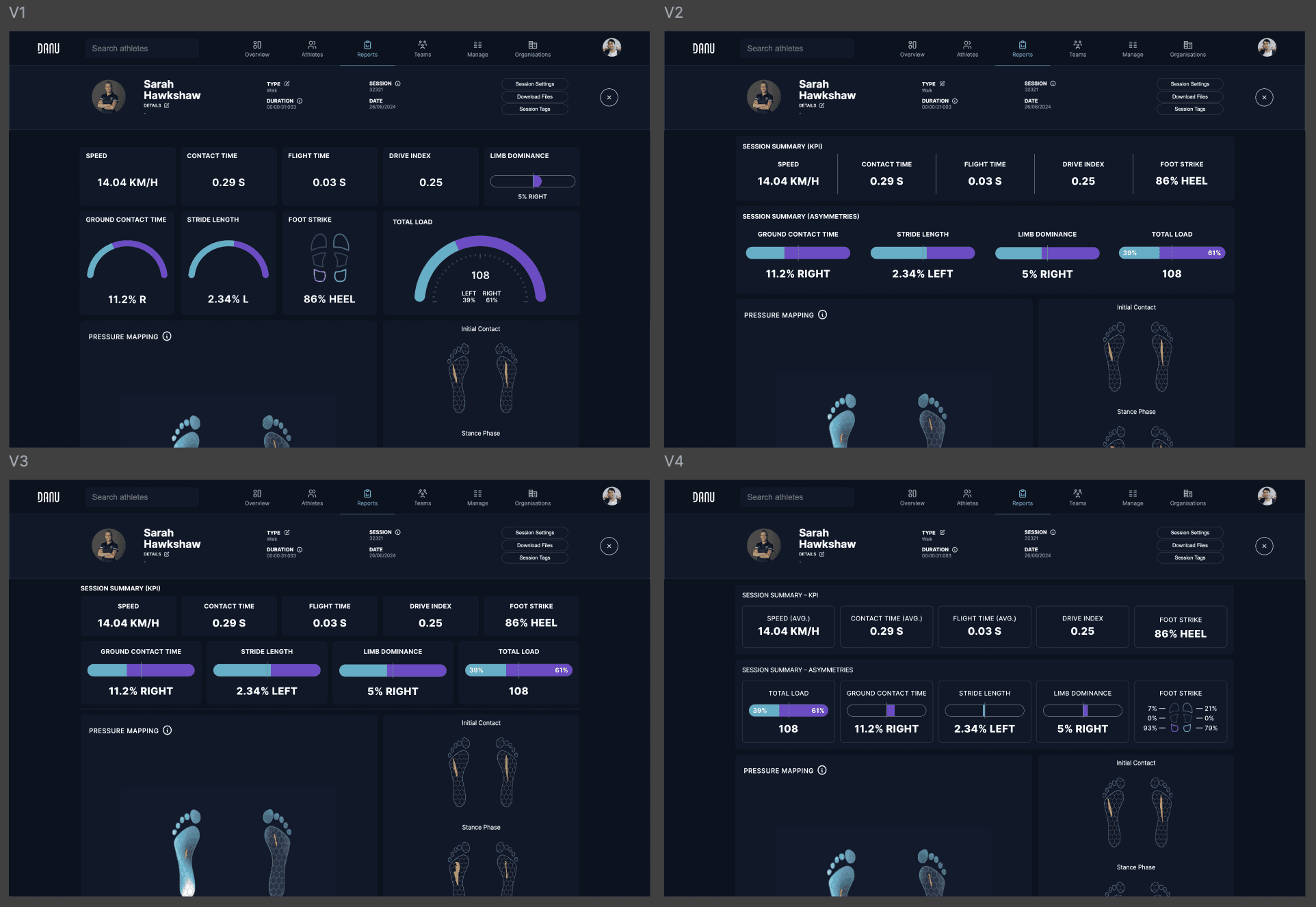
The major iterations of the design process
This solution made good use of the UX Law of Common Region by clearly distinguishing each individual element while also making it clear they are a group. One last change I decided to make was to create a more obvious difference between the ‘Total Load’ metric and individual asymmetries as it was the only graph that was calculated out of 100%, rather than split into a ‘left’ or ‘right’ value.
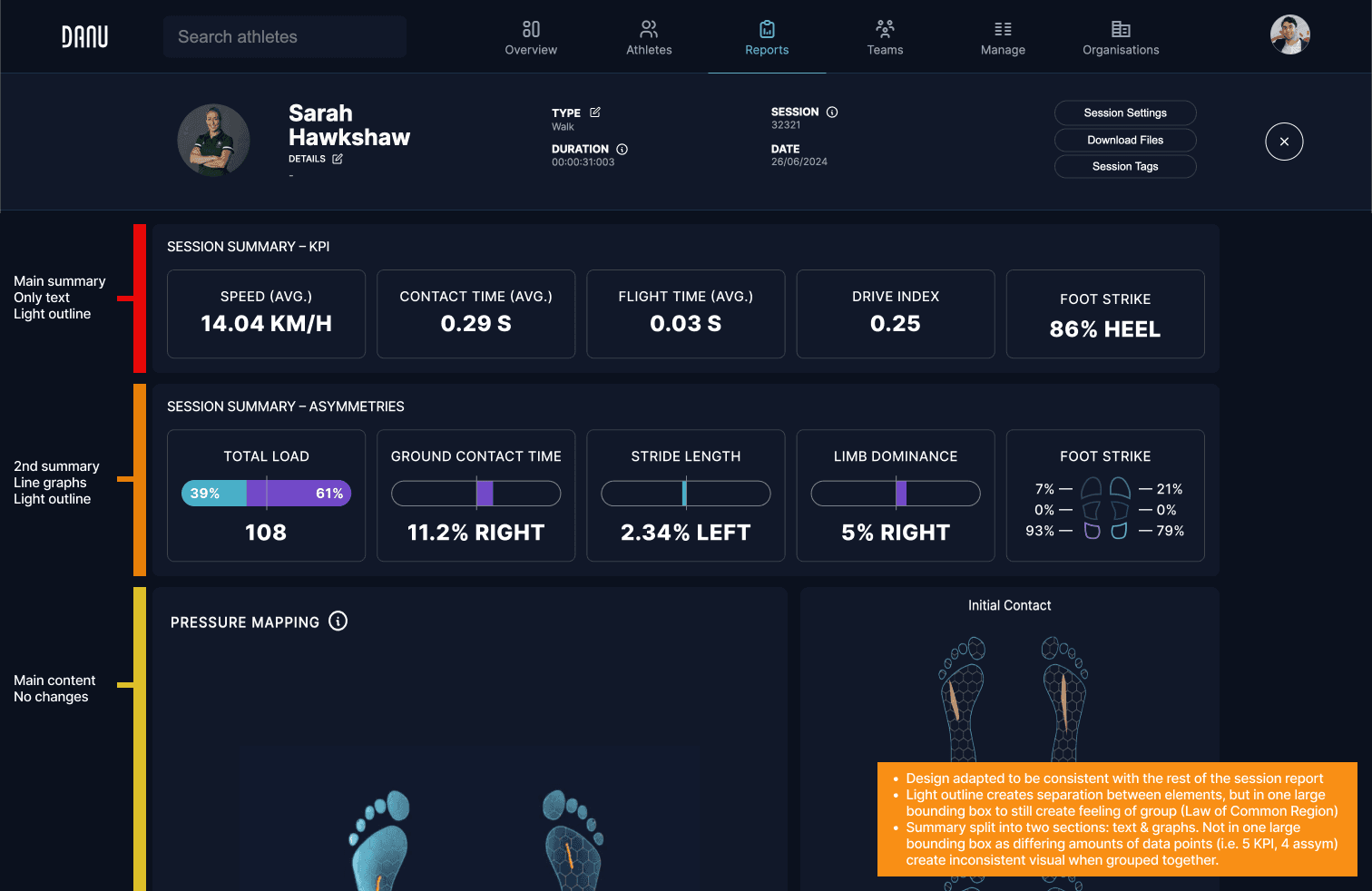
Final design of the session summary project.
I proposed the solution pictured above to the entire DANU team and it was instantly signed off on, with the developer beginning work on it right away. Meanwhile, I diverted my attention to the score system.
Part two: the score system
To begin the second part of this project, I called for a discovery meeting with the team to once again figure out the deliverables for this project. We had a discussion on the use-case of the feature and determined it would be a gait-specific metric. During the meeting the data scientist proposed creating our own grading framework and provided a list of five metrics we could potentially use for the scoring.
The aim of this feature would be an easy-to-read table which contained all the relevant information of the session and would sum it up into a single score. It would allow all users of the system to make deductions on whether a session was positive or not in a few seconds instead of minutes.
I started the design of the feature by creating rough sketches on paper to try and determine suitable characteristics. I tried to visualise how the breakdown might work, what the score should look like, and the overall size and shape of the whole feature.
Next, I moved onto rapid high-fidelity prototyping. I started with a design based on the DANU stability score (a score system for balance assessments) to try and maintain consistency in design and data visualisation throughout the DANU analytics platform. I used my sketches and the design of the summary table as guidelines on where to position elements, but I was struggling to get a coherent result.
I moved onto another idea and tried experimenting with numbers as a focal point, rather than large graphs. A struggle in this phase was determining how to group and divide each element so that the whole breakdown made sense. Finally, two results had a satisfying design proposition, however once I proposed these to the team, we all agreed there was a missing “oomph” factor – the metric didn’t scream importance the way it needed to.
I decided to simplify the design further and really elevate the main metric by placing the score breakdown into a well-marked pull-out tab. This decision to utilise a single number was a breakthrough and really worked well in achieving the goal we set out to solve. Users would now be able to determine if a session was “good”, or otherwise, in an instant. The final design came very quick and just required final refinements to utilise the empty space correctly. I even went a step further in making it a clear performance gauge by abandoning the DANU blue and utilised a red-to-green gradient.
Apologies but this is where this case study currently ends. The rest is coming soon!
© 2026 Kacper Ufniarz